About this Daily Classroom Special
Picture Math was written by Ed Clement, former Teachers Network web
mentor and a teacher in the Chicago public school system for more than twenty six
years.
Picture Math
YOUR STUDENTS WILL MAKE PICTURES AS THEY SOLVE MATH PROBLEMS.
BASIC STEPS
- Make or purchase enough Cartesian coordinate grids for your
class.
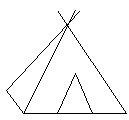
- Draw a picture, like the tee-pee shown above, on the grid.
(Other possible pictures that I've used are a star, a fort,
a rocket, a wind mill, a sail boat, a Christmas tree, and a
daisy.)
- Determine the set of Cartesian coordinate points needed to draw each step of the picture, and place the coordinate pairs in sequential order.
- Devise a pair of computation or word problems for each step, so that the correct solutions to the problems match the coordinates determined above.
- Create a set of student work sheets, presenting the problems in sequential order.
- Teach your students how to plot Cartesian coordinate points.
- Have your students work out and plot the answers to the problems on their work sheets.(Student answers can be checked in a matter of seconds by looking over the drawings.)
- Cut out and color the picture, then post in
classroom.(optional)
HIGH TECH STEPS
- Make or purchase enough Cartesian coordinate grids for your class.
- Draw a picture, like the tee-pee shown above, on the grid.
(Other possible pictures that I've used are a star, a fort,
a rocket, a wind mill, a sail boat, a Christmas tree, and a
daisy.)
- Determine the set of Cartesian coordinate points needed to draw each step of the picture, and place the coordinate pairs in sequential order.
- Devise a pair of computation or word problems for each step, so that the correct solutions to the problems match the coordinates determined above.
- Create a set of student work sheets, presenting the problems in sequential order.
- Teach your students how to plot Cartesian coordinate points.
- Have your students solve the problems and then plot and print out their results on a computer assisted design program (CAD). They could also make and plot a list of the answers on a graphing calculator.
- Cut out and color picture print outs, then post in
classroom. (optional)
Needs List
| SIMPLE |
HIGH TECH |
- Cartesian coordinate grids
- ruler
- pencil
- scissors
- crayons
|
- Same as simple, plus:
- Computer loaded with computer assisted design software(I use Quickcad by
Autodesk)
- Graphing calculator (I use texas instruments TI-83)
|
X
-4
-4
-4
-2.5
4.5
3
4.5
-4
-4
-1
-4
-4
4.5
|
Y
-2
1
2
3
-2
-1
-1.5
2
1
-.5
-2
-3
-.5
|
On the left are the coordinates to make the tee-pee on a ¼ inch grid.
Below is what the tee-pee will look like.
 |
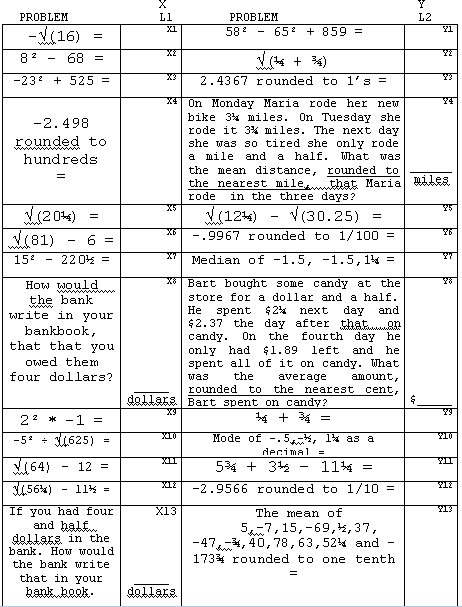
Below is a sample
student work sheet. The answers to the problems match the coordinates
in the table shown above.
When students solve
the problems, plot the answers on their grids and connect the dots,
the tee-pee shown above will appear.
TP WORK
SHEET PART II
CHANGE
MIXED NUMBERS AND FRACTIONS TO MIXED DECIMALS OR DECIMALS BEFORE
ENTERING THEM INTO YOUR CALCULATOR
 |




