Differentiated Learning Using the Computer
Ann Stephenson
One of the most challenging experiences a new teacher faces is when the realization occurs that all students are not cut out of the same mold. The textbook variety student may not exist in your classroom and all students don’t finish their work at the same time. Asking them to silently read to fill the time works only for a small percentage of learners.
What to do? Fire up all the available computers in the classroom to enable students to engage in stimulating projects and activities. This will allow you to work with those students who need extra time to learn a skill or concept.
When the whole group time or subject assignment is completed and you are working with small groups, begin with those who finish early. If their work meets with your satisfaction, and they aren’t racing through it just to be assigned to a computer, allow them to begin a technology project. These students bore easily if they aren’t kept busy. A thought-provoking challenge will keep them engaged throughout the time in your class.
Talented students
Doubling up on the computer will teach the boys and girls cooperation, and the result will be a more productive outcome of the assignment. A few examples for these students are:
- Single page website
- Classroom newsletter
- Databases using student information such as an address or e-mail list
- Spreadsheets
- Power Point Presentations
- Track attendance and make a bar graph
- Daily rate of money exchange between the United States and a foreign country
- Make a directions booklet including various skills used on the computer
- These may be ongoing and saved on the desktop for their future use and convenience.
The following websites will assist them.
How to Create a Webpage
http://make-a-web-site.com/
Tips on Creating a Great Classroom Newsletter
http://schoolweb.missouri.edu/poplarbluff.k12.mo.us/lowe/MSWordNewsletter.htm
Currency Converter
http://finance.yahoo.com/currency?u
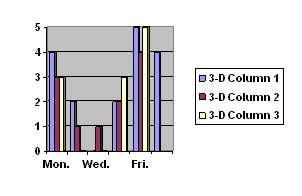
To create a bar graph for tracking attendance for one week:
Go to Microsoft Word
Insert
Object
Create new
Object type = Microsoft Graph Chart
OK
To replace the sample data click on a cell on the datasheet and type the new text/number
ESE (Exceptional Student Education)
Although you may spend more group time with these children, allow them to use the computers as well. It not only provides them with a sense of belonging, it will encourage their thinking skills. Some types of activities to assist these tactile learners would be:
Creating charts
Dividing and coloring parts of it to produce and compare fractions
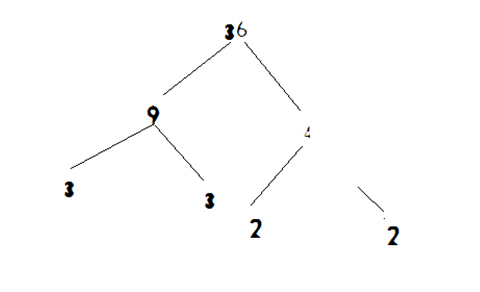
Make a factor tree using Microsoft Paint:
Find an online homework helper and ask it a question
Free Homework Help
www.freeworldu.org
Welcome to Path!
www.pathwhelp.org/
Make a timeline of a history unit adding clip art.
ELL (English Language Learners)
Find puzzles online.
Printable Word Search Puzzles
http://printactivities.com/Word_Search_Puzzles.html
Puzzles.com
www.puzzles.com
Using Microsoft Paint, make a geometric house or figure using shapes such as squares, triangles, circles, etc. and label the shapes in English. Then change ink color for each shape
Write a Picto-Story. Here's an example:

Be sure to double space so the person reading the story will have room to write in the appropriate word under the picture. This can be done without having to print it. Write the story, and save it under a specific name and put it on the desktop. When someone reads it and fills in the words, it can be saved using another name. Or it doesn’t have to be saved at all.
Find a picture of a famous artist, inventor, sports figure, etc. Cut and paste it into a Word document. Then using an online dictionary and thesaurus. Write ten words that describe the person. Save it to a folder on the desktop and add more from time to time.
www.Wikipedia.com
www.dictionary.com
ADD (Attention Deficit Disorder)
Download a touch typing program, or simply type a half page of the QWERTY letters in large print. Show them where to place their fingers and practice for ten to fifteen minutes. Not only will it calm them down, it will also teach themto type.
For a whole class activity assign them to groups by table or mixed exceptionalities and conduct a scavenger hunt. It will have more significance if the topic includes something they are already studying, such as a science or social studies theme.
Choose a theme and ask a question or pose a topic. The students research three websites for the answers and paraphrase the information. They include the addresses of the websites on their resource page.
All groups
Create an ad to “advertise” or “sell” something. Use clear, concise words and clip art as well as a frame or border. Ex. snow shoveling, babysitting, etc.
When children are engaged in enjoyable learning activities there usually isn’t a need for discipline. If the classroom does not have many computers, schedule time in the library once a week, so the students can experience some of the academic discoveries to be found on the computer.
Do you have a question or comment about this article? E-mail me.
|




