How To: Upgrade Your Overhead to a Document Camera: This will change your life in the classroom!
Allisyn Levy
A few years ago, a friend was telling me how her whole school upgraded from overhead projects to document cameras. I remember being intrigued at the time, but I didn’t really do any research on what exactly a document camera is and does until recently. As soon as I learned what it was, I wanted one, and found the money to buy one for my classroom by writing a grant.
| |
So, what is it?
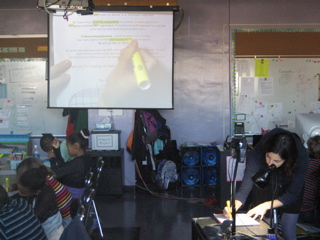
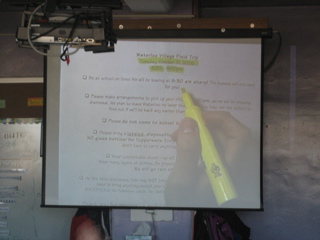
A document camera is like an overhead projector that doesn’t use transparencies (I have a tendency to avoid using anything that requires a transparency!) You can place any object–-a piece of paper, any student work, 3-D objects, whatever--on the platform of a document camera and a video camera connected to a projector displays the work. |
 |
How do I use it?
Apart from a dynamic tool for shared reading (I now put nearly everything I read to my students, from a read aloud chapter book or picture book, to homework assignments), I eagerly share student work, and encourage my students to share their work. The document camera allows us to look at different ways to solve problems, to share exemplary work, and to fix up work that could use improvement. Having the document camera creates new opportunities for my students to work on public speaking and presentation skills, and they are all anxious to get up and share--even my shyest kids! |
 |
Is it difficult to operate? And what else do I need to make it work?
The document camera is extremely simple to use, once you set it up. The video camera is mounted to an adjustable goose arm, and there is a gooseneck lamp mounted next to the camera to allow for bright images. In my classroom, this is connected via a wireless transmitter to an LCD projector (you could also project through a TV). I leave the camera setting on throughout the day, and turn off the lamp and LCD projector when the document camera is not in use. It takes only a second to turn on, so spontaneous decisions to use it (which happens all the time!) are easy to take advantage of. |
 |
|
Who makes these things and where do I get one?
There are a range of document cameras available for a range of costs. Elmo is a well-known brand, but I ended up going with a less expensive brand called Lightsmith Imager. It got great reviews from teachers, offered a wireless option (for connecting to a projector), and I found their technical support to be helpful. You can even get a wireless model so that you’re not constrained by cords hanging all over your classroom.
What if my school can’t afford one?
Write a grant! Look into www.donorschoose.org. Check out Teachers Networks grant pages. Subscribe to Public Education Network’s NewsBlast: you’ll receive a weekly e-newsletter that includes a listing of upcoming grant deadlines.
Once the document camera is set up, it will change how you teach forever! It really is as simple as turning it on and finding something you want to share with the class.
Additional Resources:
101 Ways Teachers Use Document Cameras, Educational Technology, San Diego Unified School District.
Document Camera Helps Capture Students' Focus on Learning, eSchool News Online.
Lightsmith Imager
Elmo USA
Do you have a question or comment about this article? E-mail Allisyn.
|




